Portable A320 cockpit trainer with interactive panels and MCDU practice
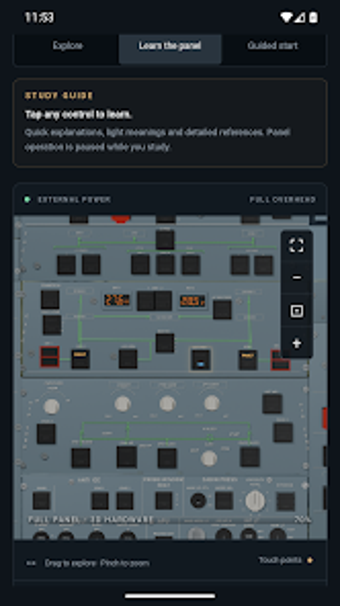
Flightdeck A320 opens the A320 cockpit for hands-on study, letting users operate switches, pan and zoom panels, and practise MCDU entries in a mobile environment. Developed by Choose My Electric for Android, the app combines visual cockpit familiarization with navigation and failure training options. It targets student pilots, crew members on type rating tracks, and aviation enthusiasts seeking a technical, portable reference to reinforce procedural and systems knowledge.
What it teaches through hands-on cockpit work
Flightdeck focuses on cockpit familiarization by providing interactive hardware elements and system layouts, so learners can identify controls and trace system logic visually. The app exposes the Overhead panel, Glare Shield, and Center Pedestal for direct interaction, and includes realistic cockpit sounds, which supports recognition of physical controls and alert cues during study sessions.
How it supports procedural practice and data entry skills
The tool lets users practise MCDU entries for both Airbus A320 and Embraer E175, offering concrete exercises in route and performance data entry. The presence of a navigation database and AOC/datalink practice in the Complete upgrade provides realistic waypoints and airway structures for procedural drills, reinforcing the sequencing and text-entry habits required in type rating training.
Who benefits and how accessible it is for learners
The app suits student pilots and flight crew preparing for A320 type ratings, along with technically minded enthusiasts, because it targets system-level study rather than flight simulation. Core cockpit exploration and the study guides work offline, and the Android build runs on phones and tablets, which supports learning during travel or when network access is limited.
Content depth, customization, and training progression
Content scales from free cockpit exploration to an optional Complete upgrade that adds ECAM displays, failure training, and a navigation database, letting users progress from recognition to scenario practice. The dual-aircraft MCDU support and control-by-control study guide let learners focus on specific systems or tasks and tailor sessions to their training priorities.
A targeted study aid best for system familiarization and procedural practice
Flightdeck is a focused educational tool for trainees and crew who need portable, interactive exposure to A320 systems and procedural workflows. It does not replace a full flight simulator or official training devices, so use it as a supplemental study resource. Practical tip: set short, regular practice blocks for entries and panel drills to convert repeated interaction into reliable procedural habits.